Step 02: Skills
Extend your agent with
SKILL.md.
Skills are lazy loaded capability referencing official doc for more details.
Prerequisites
Same as Step 00 - copy the config file and add your API key:
cp default_workspace/config.example.yaml default_workspace/config.user.yaml
# Edit config.user.yaml to add your API key
What We will Build?
Skills are lazy loaded capabilities at runtime. It isn't something Openclaw invented, but an open standard. Reference the official document for more info.
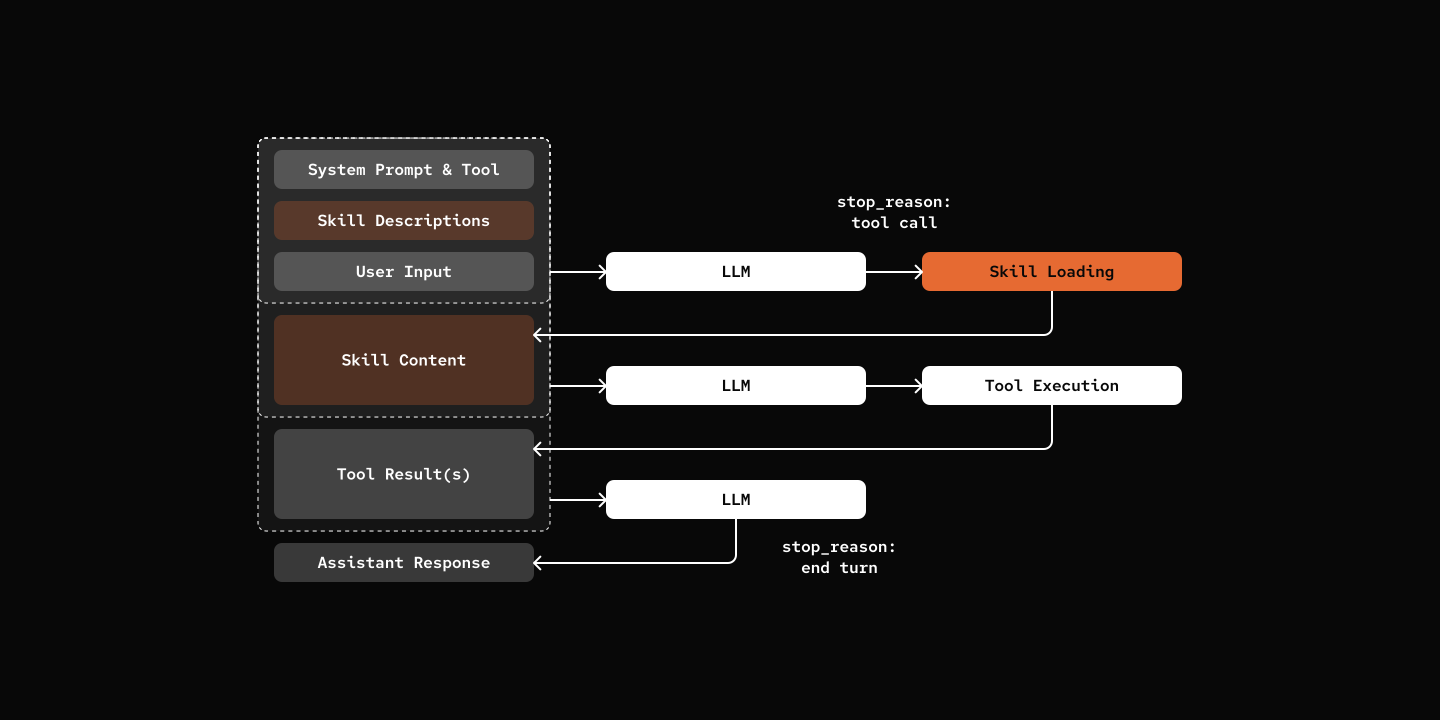
Key Components
- SkillDef: Skill definitions (id, name, description, content)
- SKILL.md: YAML frontmatter + markdown body format
- skill tool: Dynamic tool that lists available skills and loads content on-demand
def create_skill_tool(skill_loader: "SkillLoader"):
    """Factory function to create skill tool with dynamic schema."""
    skill_metadata = skill_loader.discover_skills()

    # Build XML description of available skills
    skills_xml = "<skills>\n"
    for meta in skill_metadata:
        skills_xml += f'  <skill name="{meta.name}">{meta.description}</skill>\n'
    skills_xml += "</skills>"

    @tool(name="skill", description=f"Load skill. {skills_xml}", ...)
    async def skill_tool(skill_name: str, session: "AgentSession") -> str:
        skill_def = skill_loader.load_skill(skill_name)
        return skill_def.content

    return skill_tool
Notes
Openclaw does not implement skill system with a separate tool. Instead, it uses system prompt injection with file reading.
Two Approaches to Skills
Tool Approach (this tutorial):
- Dedicated
skilltool lists available skills and loads content - Tool schema includes skill metadata in its description
- Agent calls
skilltool to get skill content - Self-contained skill discovery and loading
System Prompt Approach (OpenClaw):
- Skill metadata (id, name, description) injected into system prompt
- Agent uses standard
readtool to read SKILL.md - No specialized skill tool needed
- Simpler tool registry
To implementing skills as part of system prompt, inject that as one more layer of prompt as mentioned Step 13: Multi-Layer Prompts.
Try it out
cd 02-skills
uv run my-bot chat

# You: What skills do you have available?
# pickle: Hi there! 🐱 I have access to two specialized skills:
#
# - **cron-ops**: Create, list, and delete scheduled cron jobs
# - **skill-creator**: Guide for creating effective skills
#
# Is there something specific you'd like to do with either of these, or do you have another task I can help you with?
#
# You: Create a skill to access Weather Information
# pickle: [Loads and create a weather-info skill]
What's Next
Step 03: Persistence - Remember conversations across sessions